Exchange 2007 CAS certificates without host names?

 02 Jul 2008 07:35:34 am

I've made statements in the past regarding which names are required on your CAS certificates and sometimes get funny responses when I state that you don’t need the internal NetBIOS/FQDN host names on the certificate. Fact is depending on your deployment they may not be required (and in fact there are some arguably good reasons to leave them off). So if you’re interested here is how it’s done here is more detail, for the sake of this discussion I'm going to focus on CAS role only.

The names to use on the cert for this example are mail.domain.com and the second is autodiscover.domain.com (and those are the only names used). Externally connectivity is through ISA which has the CASes published as a web-farm, internally the CASes are shared using a load-balancer; both use the same certificate. All services are published using a SINGLE listener in ISA. Split-brain DNS allows clients internally versus externally to end up where they need to be.

Let’s have a look at the setup:

First, for those that are familiar with the autodiscovery process, domain-joined/domain-connected Outlook clients will query AD for SCP records used for autodiscovery; AD returns a list of in-site and out-of-site CAS URIs Outlook can use for autodiscovery (for non domain-joined/domain-connected clients autodiscover.domain.com is used first). The records that the CASes use are published by Exchange based off the AutodiscoveryserviceinternalURI:
>Get-ClientAccessServer | fl autodiscoverserviceinternalURI
AutoDiscoverServiceInternalUri : https://mail.domain.com/Autodiscover/Autodiscover.xml

This was done on all CASes in your “internet site” (the ones behind the load balancer), the net result is Outlook gets X SCP records (where X equals the number of CASes) that all point to the same place (the load balancer).

Next I need to make sure EWS uses the right URLs so that Availability, etc. work correctly:
>Get-WebServicesVirtualDirectory | fl internalURL, externalURL
InternalUrl : https://mail.domain.com/EWS/Exchange.asmx
ExternalUrl : https://mail.domain.com/EWS/Exchange.asmx

The rest of the URL configuration for things like OWA, OAB, etc. can all be done from the Management Console:
>Get-OwaVirtualDirectory "owa (Default Web Site)" | fl internalURL,externalURL
InternalUrl : https://mail.domain.com/owa
ExternalUrl : https://mail.domain.com/owa
>Get-OabVirtualDirectory | fl internalURL, externalURL
InternalUrl : http://mail.domain.com/OAB
ExternalUrl : https://mail.domain.com/OAB

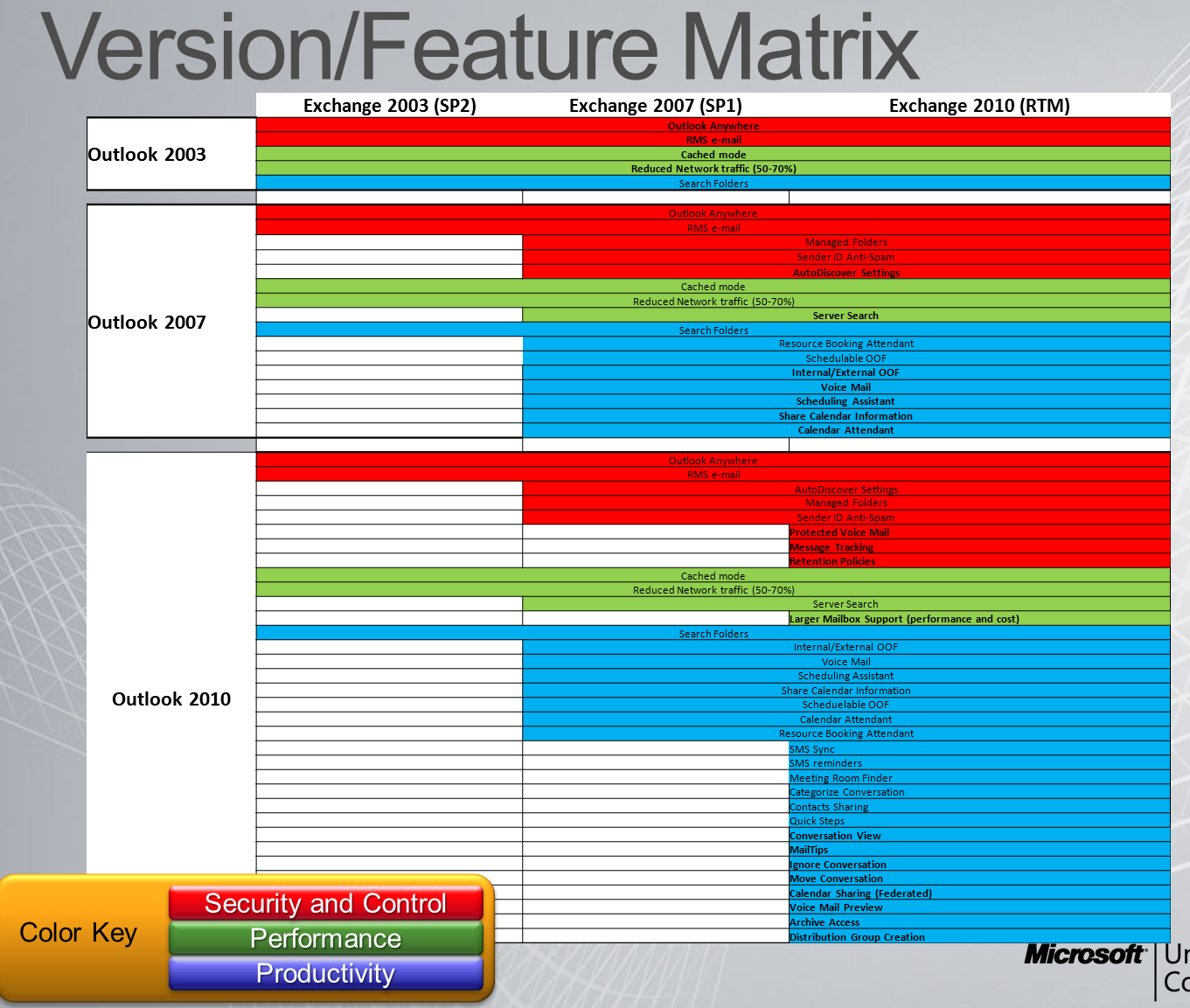
For those who want a nice visual of how Outlook builds the profile using AutoDiscovery internally versus externally I've included a couple of slides from TechEd last year as a reference:


Cheers,
Erik

By : Erik | Category: Exchange | Comments [ [2]] | Trackbacks [0]

  Issues with web OAB gen for Exchange 2007 CMS on Server 2008

 29 May 2008 10:43:19 am

You and me both. To give you the short answer up front this is something Microsoft is aware of and activity working to fix; however they need your help, if you’re experiencing these issues please contact PSS to have a support case opened. Typically there is no charge for bugs, so make sure you request a refund.

In the meantime there are some workarounds (and I’ll get to that shortly), but before you attempt them you should be aware of the details of the issues so you know what you’re working around and you’re able to support it.

That said what are the problems? There are issues effecting both CCR as well as SCC clusters, the issues are different and the symptoms will affect your environment in different ways.

CCR Clusters: On CCR clusters OAB generation will only occur on a single node, typically that’s the first node that was added to the cluster (more information about OAB generation under CCR here). The problem with CCR clusters is that when OAB generation occurs on the node the ExchangeOAB is created on that node, with Server 2003 that share was accessible by both \nodeExchangeOAB as well as \CMSExchangeOAB. Under Server 2008 the OAB is generated and made available under \nodeExchangeOAB however is not available under \CMSExchangeOAB. On the CAS(es) there is a service that runs, the MSExchangeFDS (File Distribution Service) which reaches out to the mailbox server (standalone or clustered) and copies the OAB(s) up to the web OAB directory; when the mailbox is clustered it goes to the CMS. In turn this fails and generates Event ID 1021 indicating that the \CMSExchangeOAB[OAB GUID] is not available, if you try and pull that path up yourself you’ll notice it doesn’t exist either.

The net result? Your Outlook clients cannot download a copy of the OAB and get the ever enjoyable 0x8004010F sync errors. If the CAS has an old version of the OAB (i.e. if it was previously generated on a 2003 server) it will not get updated and the clients will continue to download the old version.

SCC Clusters: On SCC clusters the issue is a little harder to spot; as I understand it what happens is that the OAB generation process kicks off and attemps to create the ExchangeOAB share, which is already present, and fails with an error Exchange is not expecting. This causes the OAB generation process to fail however the share and OAB that was generated the first time the process was run which the CAS continues to download. I don’t have any current SCC projects on 2008 to confirm further details, there may be additional symptoms/information.

The net result? A stale OAB.

In both cases the only supported workarounds is to move OAB generation off of the 2008 CMS. If you have a standalone mailbox server or 2003 CMS you’re in great shape! Otherwise you would have to build an additional mailbox server for OAB generation.

There are a couple of unsupported workarounds as well:
If CCR you can copy the contents of the OAB to the CAS under ClientAccessServerOAB - the catch is that permissions need to be applied to the OAB properly otherwise the users will get authentication dialogs in Outlook when it attempts to download the OAB and in IIS on the CAS you’ll see 401 errors.
As I understand it if SCC you can delete the ExchangeOAB share prior to the OAB generation process starting (by default 5am daily) that way the share creation doesn’t cause the process to bomb out.

As I said earlier please contact PSS if/when you experience these issues, the more cases they get (and therefore the more customers that they know are effected) the more forthcoming a supported fix should be.

Cheers,
Erik Szewczyk

8/13/2008 - Update to this issue here: http://www.spyordie007.com/blog/index.php?mode=viewid&post_id=27

By : Erik | Category: Exchange | Comments [ [58]] | Trackbacks [0]

  How to perform a move-mailbox based on group membership

 07 Apr 2008 10:00:12 am

This example is based on how to easily move users based on group membership in Exchange 2007, however the same process could easily be used against a get-user, get-mailbox, import-csv, etc. (of course filtering the results we're interested in). The important thing is that we end up with an array that contains the list of users we want and then to pipe that to the move-mailbox cmdlet.

$group = get-group <groupname> | select members

Lets take a look at what I just loaded into $group:

$group
Members
------
{user1, user2, user3}

Now what I'm really interested in is an array under $group.members:

$group.members
<excerpt>
Rdn
: …
Parent
: …
Depth
: …
DN
: …
DomainId
: …
ObjectGuid
: …
Name
: user1
</excerpt>

Based on this query the users are stored in an array under $group.members with the Name under the $_.Name field. I could just move them all by doing a:
$group.members | foreach { move-mailbox $_.Name -TargetDatabase <mbx server><mbx DB> -ValidateOnly }

(Validate only so if this gets cut and pasted into a script/shell it doesn’t actually make the move)

The one problem with this is that the foreach will loop them the user list serially (moving only one user at a time before executing the next move-mailbox). However since move-mailbox is capable of executing multiple threads a more ideal solution to this is to perform a get-mailbox based on the users stored in the array and then pipe it to the move-mailbox command


$group.members | get-mailbox | move-mailbox -TargetDatabase <mbx server><mbx DB> -ValidateOnly

By : Erik | Category: Exchange | Comments [ [6]] | Trackbacks [0]

  Installing MySQL 5.x on Server 2008 x64 RC1

 01 Feb 2008 11:05:28 am

If you’ve tried to install MySQL 5.x on Server 2008 x64 you’ve probably seen MySQLInstanceConfig.exe (The MySQL Server Instance Config Wizard process) bomb out with the following error:

“The application has failed to start because its side-by-side configuration is incorrect. Please see the application event log for more detail.”

If you review the event log you see the corresponding error:

Source: SideBySide
EventID: 63
“Activation context generation failed for "…MySQLInstanceConfig.exe".Error in manifest or policy file "…MySQLInstanceConfig.exe" on line 6. The value "asAdministrator" of attribute "level" in element "urn:schemas-microsoft-com:asm.v1^requestedPrivileges" is invalid.”

This happens with both the x64 and the x86 versions of MySQL because both of them use the 32-bit version of MySQLInstanceConfig.

From playing around with it I haven’t been about to find a way to get the configuration wizard working. From some Google searches I hadn’t seen information out there about how to get around it either. The good news is that (so far as I know) all the work that the wizard does can be done manually and you can work around this problem. First let’s look at what the wizard does:


  • Builds the my.ini file that contains the MySQL settings (connection config, path to data files, etc.)
  • Modifies security (allowing you to set the root password)
  • Configures the MySQL process (mysqld-nt.exe) to run as a service

So to get MySQL running:

  1. Rather than trying to build the my.ini file from scratch I suggest starting with one of the examples that get installed to the root MySQL directory (by default 'C:\Program Files\MySQL\MySQL Server 5.0'). Choose which file makes the most sense and copy it to my.ini and edit appropriately. If you need more information on using the options file see:
    http://dev.mysql.com/doc/refman/5.1/en/windows-create-option-file.html
  2. From an administrator’s Windows command prompt install as a service and start it:
    Code :
    >'E:\MySQL\bin\mysqld-nt.exe' --install MySQL --defaults-file='E:\MySQLmy.ini' & net start MySQL

    (just make sure to update your path with wherever it is that you have MySQL installed)
  3. Using the MySQL Command Line Client set your root password and/or create new users as appropriate:
    Code :
    mysql> GRANT ALL PRIVILEGES ON *.* TO 'root'@'%'
    -> IDENTIFIED BY 'password' WITH GRANT OPTION;

    (Just replace ‘password’ with whatever you want your password to be, this will allow you to connect to the server as root from anywhere)

From here on connect to it like you would normally with tools such as MySQL Administrator, etc.

Cheers,
Erik

By : Erik | Category: General | Comments [ [3]] | Trackbacks [0]

  Passed 70-237 with a score of 921

 31 Jan 2008 04:29:47 pm

I went and took 70-237 – “PRO: Designing Messaging Solutions with Microsoft Exchange Server 2007” today and passed with a 921. I’m quite pleased with the results (I only squeaked by on 70-236 with a 790-something).

I did minimal preparation for this exam (pretty much just reviewed the topics/prep guide on Microsoft.com - http://www.microsoft.com/learning/exams/70-237.mspx)

As others have said this exam is quite easy, if you did okay on 70-236 go right on to 70-237. In fact a lot of the questions were remarkably similar except that 237 did not have many PowerShell related tasks, it’s mostly focused on design-related topics.

On to 70-238 and my MCITP!

By : Erik | Category: Exchange | Comments [ [1]] | Trackbacks [0]


Aug 2010 September 2010 Oct 2010
S M T W T F S
      1 2 3 4
5 6 7 8 9 10 11
12 13 14 15 16 17 18
19 20 21 22 23 24 25
26 27 28 29 30   

Categories

Recent

Archives

User List

Search

Syndication

rss0.90
rss_2.0